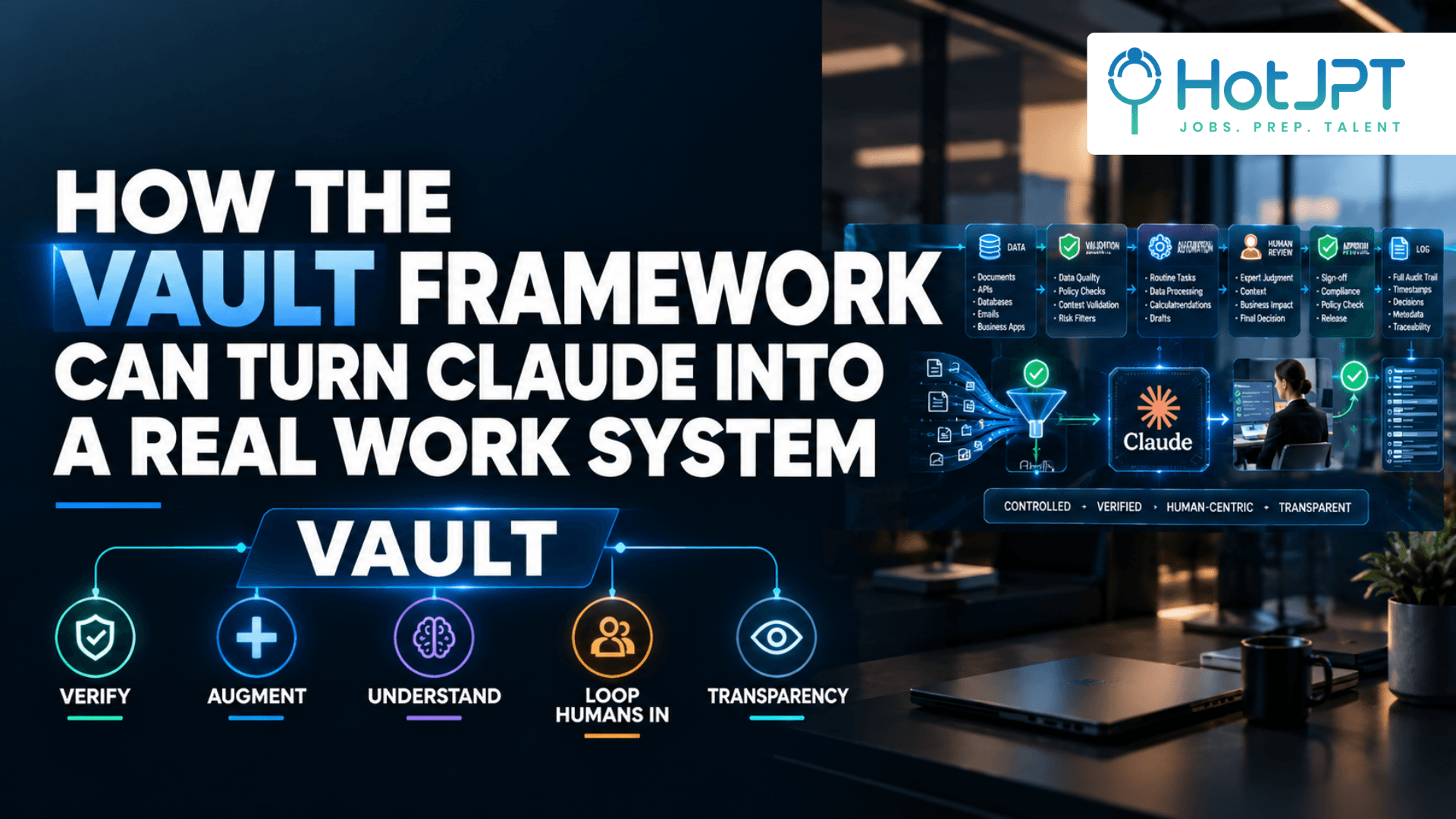
How the VAULT Framework Can Turn Claude Into a Real Work System
Most people use Claude as a faster chatbot. The bigger opportunity is to make AI one controlled part of a larger work system where data is verified, repetitive work is automated, humans approve high impact actions, and important results can be inspected.
According to the supplied source material, the VAULT framework comes from a former Goldman Sachs employee who worked in business intelligence. The framework focuses less on choosing a particular AI tool and more on designing the workflow around it.
Problem: AI can produce convincing answers without guaranteeing they are correct or safe to act on.
Framework: VAULT — Verify, Augment, Understand, Loop Humans In, Transparency.
Payoff: Instead of asking AI to do everything, build a workflow where AI handles the work it is good at while automation, testing, data checks, and people control the rest.
The VAULT Framework at a Glance
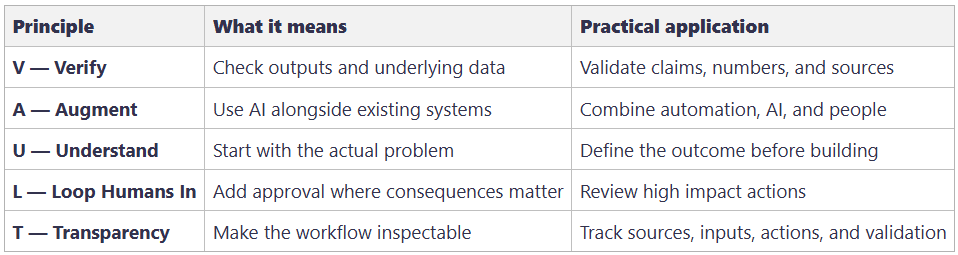
The key idea: VAULT is not a tool selection framework. It is a workflow design framework.
1. V — Verify the Output
AI can produce a polished answer in seconds. A polished answer is not automatically a correct one.
Verification starts before the model generates its conclusion. If the underlying business data is incomplete, outdated, duplicated, or incorrect, AI can simply turn bad information into a convincing answer faster.
The same principle applies to reports, financial analysis, code, research, and operational decisions. AI should produce something that can be checked rather than something that receives automatic trust.
Example: A weekly revenue report should not let AI calculate figures from unvalidated raw data and immediately publish them. Data should first be cleaned and calculations checked against the original source. AI can then interpret the verified results.
Copy paste prompt:
“Before giving me the final answer, recheck every number and factual claim. Cite the source for each one and flag anything you're not fully confident about.”
Takeaway: Treat AI output as a draft that needs appropriate verification, especially when the consequences of an error are high.
2. A — Augment, Don't Replace
Not every business problem needs an AI agent.
Predictable processes such as scheduled reports, database updates, calculations, and rule based operations are often better suited to traditional automation. These systems can be easier to test, reproduce, debug, and monitor.
AI adds more value when a task requires interpretation, judgment, flexibility, or working with messy information.
Example: Consider a weekly business report. Traditional automation can retrieve the data, clean it, calculate metrics, and validate totals. Claude can then analyze the verified information and explain what changed, what trends stand out, and what deserves attention.
The resulting workflow becomes:
Data → Automation → Validation → AI Analysis → Human Review
Copy paste prompt:
“Break this process into individual steps. For each step, determine whether traditional automation, AI, or a human should handle it. Recommend the simplest and most reliable approach.”
Takeaway: Do not maximize AI usage. Use the simplest technology that reliably solves each step.
3. U — Understand the Why
AI makes building things easier. That can create a new problem: people start building before they understand what they are trying to solve.
The supplied source connects this idea to a Goldman Sachs engineering concept described as “build with purpose.” The useful lesson is broader than any particular company: define the bottleneck and desired outcome before choosing the technology.
Example: You discover a new AI agent framework and decide to build an agent for a reporting task. But if a scheduled script already solves the repetitive work, the agent may add complexity without adding value.
Start with two questions:
The problem I'm trying to solve is: [PROBLEM]
A good result would look like: [DESIRED OUTCOME]
Then compare a manual process, traditional automation, AI, and a hybrid approach.
Copy paste prompt:
“The problem I'm trying to solve is [PROBLEM]. Help me define the desired outcome and determine whether AI is actually necessary.”
Takeaway: Start with the bottleneck, not the AI tool.
4. L — Loop Humans In
Human oversight becomes more important when AI moves from generating information to taking actions.
A chatbot producing a bad suggestion is one problem. An automated system acting on that suggestion can create a much larger one.
The supplied source describes an example in which an autonomous AI agent reportedly misunderstood a task and sent a discount code to almost 200,000 people. That example is presented as a warning about giving AI too much authority without sufficient controls.
A safer pattern is:
AI → Draft → Human Review → Action
For code, AI can propose changes, tests can run automatically, and a developer can approve deployment. For content, AI can create the draft while a person reviews it before publication.
Copy paste prompt:
“Design this workflow so that the AI can prepare actions but cannot execute high impact or irreversible actions without human approval. Clearly identify where approval is required.”
Takeaway: The greater the consequence of an error, the stronger the human checkpoint should be.
5. T — Transparency
A reliable AI workflow should leave enough evidence for someone to understand what happened.
Transparency does not require exposing a model's private internal reasoning. It means recording the operational information needed to inspect and troubleshoot the workflow.
That can include data sources, inputs, tools, assumptions, validation checks, actions, approvals, and final outputs.
Example: Instead of a sales system simply producing “Revenue increased 18%,” the workflow could record the sales database used, the Q3 data supplied, the calculation performed, the validation check, the AI analysis, and the human approval.
The result becomes an inspectable chain:
Data Source → Input → Calculation → Validation → AI Analysis → Approval
Copy paste prompt:
“Document the data sources, inputs, assumptions, tools, validation checks, actions, and final results for every important execution.”
Takeaway: If nobody can reconstruct how an important result was produced, the workflow is difficult to audit or improve.
Build the Complete AI Workflow
The five principles become most useful when they are combined into one operating process.
Instead of creating nine separate stages, use one workflow:
Define the Problem → Collect Data → Clean & Validate → Calculate → Verify → Analyze with AI → Review → Approve → Log
A weekly business report could follow that exact sequence. Traditional systems handle collection, cleaning, and calculations. AI interprets the verified information. A human reviews the final result before it becomes an approved business output. The workflow then records what happened for future inspection.
The result is not simply a chatbot answering questions.
It is a controlled AI workflow.
HotJPT Take
The most useful lesson is not “use more AI.”
It is “design better systems around AI.”
Claude, Claude Code, Codex, or another model can be valuable components, but they do not need to control every step. Deterministic automation can handle predictable operations. AI can handle interpretation. Tests can catch technical errors. Humans can approve consequential decisions.
That is a more practical approach than turning every business process into an autonomous agent.
The best AI workflow may contain surprisingly little AI.
Save This: The AI Workflow Test
Before adding AI to a process, run through this checklist:
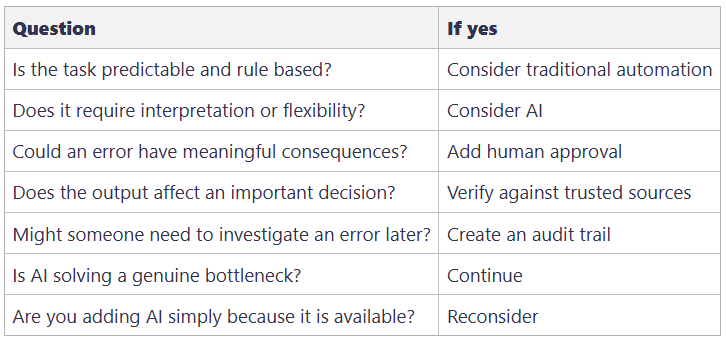
The principle is simple:
Define → Automate → Validate → Analyze → Review → Approve → Log.
The Bottom Line
The advantage is not simply having access to Claude or another powerful AI model. It is knowing where that model belongs inside a workflow.
Use automation for predictable work. Use AI where interpretation creates value. Verify important outputs. Keep humans involved when consequences are high. Make the process inspectable.
The future of useful AI is not maximum autonomy; it is well designed systems that combine machine speed with human judgment.
Frequently Asked Questions
How can I use Claude as part of a business workflow?
Start by mapping the process before choosing the tool. Separate predictable tasks from tasks requiring interpretation, then place Claude where flexible reasoning adds genuine value.
Does every repetitive task need an AI agent?
No. If a task follows predictable rules, traditional automation may be simpler and more reliable. AI becomes more useful when the work involves ambiguity, interpretation, or flexible decision support.
How do I prevent an AI system from taking a risky action?
Give the AI permission to prepare recommendations or drafts while requiring human approval before high impact or irreversible actions are executed.
What should an AI audit trail contain?
At minimum, record the relevant data sources, inputs, tools, assumptions, validation checks, actions, approvals, and final outputs. This gives people enough evidence to understand what the system did.
The HotJPT editorial team covers AI, US immigration, IT job market trends, and staffing intelligence for recruiters, bench sales marketers, and IT consultants.